Reminders and SLA
Reminders & SLA are organization-wide Time-it settings for how long a submission may wait, and when reminder emails and in-app alerts run. You find them in Administration under Settings → System → Time-it → Reminders & SLA.
SLA (service level agreement) here simply means the number of days approvers have to decide on a submission. After that, the submission counts as late.
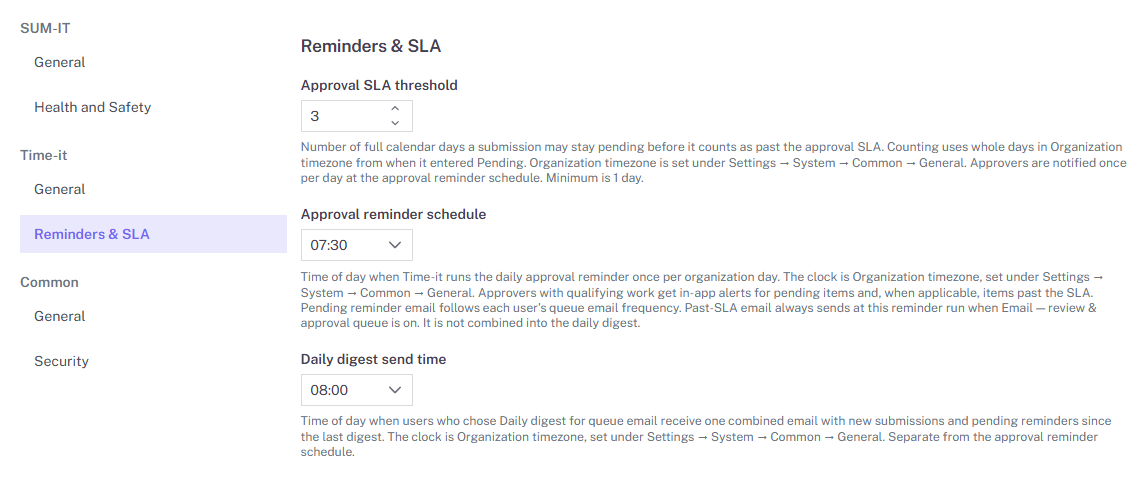
What you can set
- Approval SLA threshold — how many days approvers have to decide (at least 1). Only full calendar days count. For example, with 3, a period submitted on Monday counts as late once three full days have passed. Late items are flagged once a day, at the reminder time below.
- Approval reminder schedule — the time each day when Time-it reminds approvers about periods waiting for them. Approvers with waiting periods get a message under the bell. Whether they also get an email depends on their own notification settings. Reminders about late periods are always sent at this time, as a separate email.
- Daily digest send time — the time when people who chose Daily digest get their one summary email of the day.
All of these clocks use the organization timezone (see Organization timezone). On Approvals, the Past approval SLA status filter shows pending items that have crossed the threshold.
Who can change it
Changing these values needs Administration settings edit permission. Each person still decides in their own settings whether they get these emails.
Organization timezone is not edited on this panel. Set it under Settings → System → Common → General.