Group members and roles
Inside a user group, every person has one role: Member, Reviewer, or Approver. That role decides whether others in the group can see this person's time, and whether this person can approve the group's submissions.
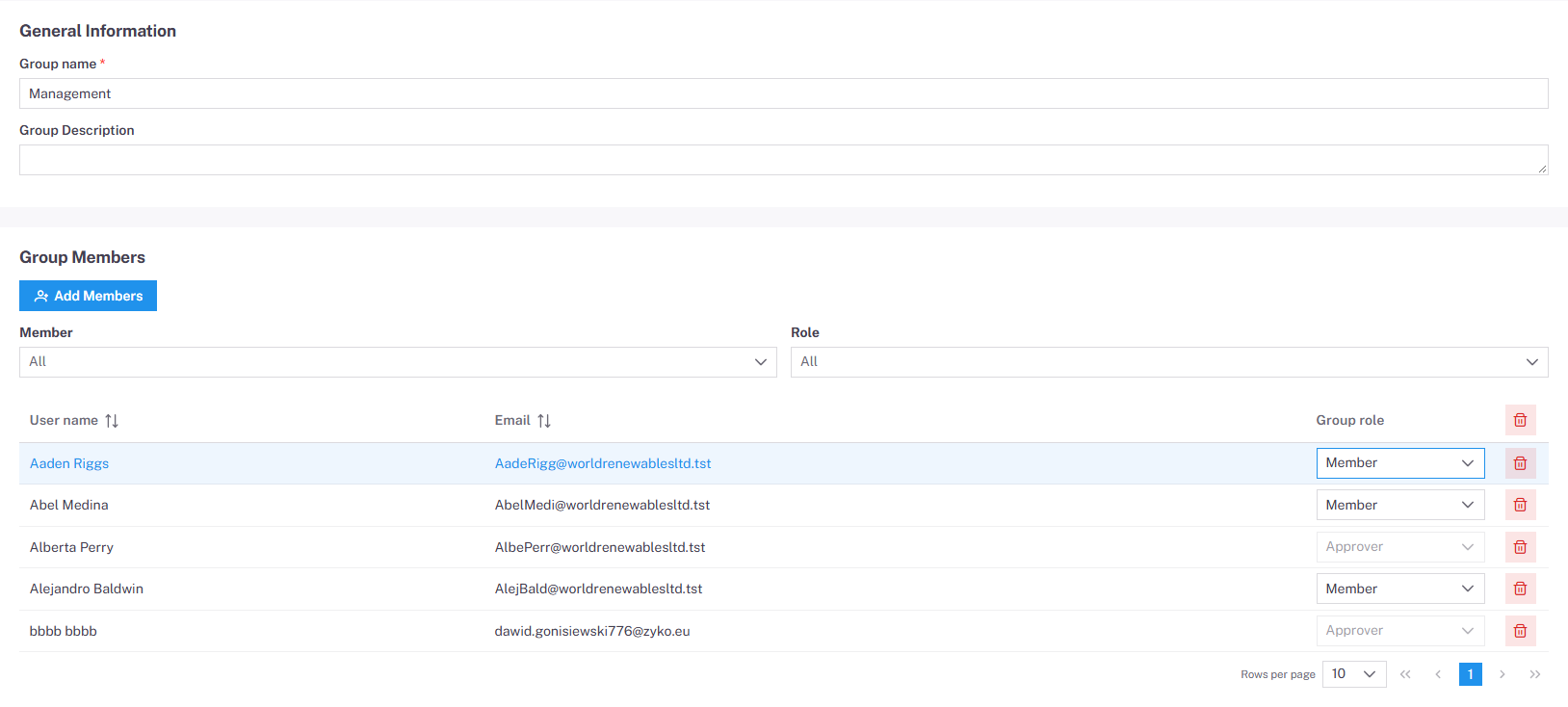
The three roles
| Role | What it means |
|---|---|
| Member | Belongs to the group. Reviewers and approvers in the same group can see this person's time (with the Timesheet View permission). |
| Reviewer | Can see group members' timesheets (with the Timesheet View permission). Does not open Approvals by itself. |
| Approver | Can see group members' time and can act in Approvals for that group's submissions. |
When you add people, Time-it only offers the roles that fit each person's permissions. For example, someone with the Timesheet Approve permission is offered Approver. Someone with View all is offered Reviewer or Approver. Other people can be offered Member, Reviewer, or Approver.
Actions
- Open a group with the magnifier icon on its row in User Groups.
- Click Add Members to pick people under Members and give each a role under Group roles.
- To change someone's role, pick a new one in the Group role dropdown on their row. A greyed-out role cannot be changed here, because Time-it only leaves one role that fits that person's permissions.
- Click the bin icon on a person's row to remove them from the group.
Same person, several groups
A person can be Member in one group and Approver in another. Visibility and approval follow each group separately.