User Groups
A user group is a team, for example a site crew or an office department. Inside a group, each person is a Member (their time is checked), a Reviewer (can see members' time), or an Approver (can see and approve it). Groups are how Time-it decides who sees and approves whose time. You manage groups on the User Groups menu.
What groups are for
Without groups, most people only see their own time (unless they have View all). When you put people in a group:
- Reviewer and Approver members of that group can see the timesheets of the group's Member people (when they also have the Timesheet
Viewpermission). - Approver members can use Approvals for that group's submissions.
One person can belong to several groups, with a different role in each.
Who can open this menu
The User Groups menu needs the Time-it User groups View permission. Creating and changing groups needs User groups Edit.
Actions
- Click Create Group to add a group, then open it to manage members and roles (see Group members and roles).
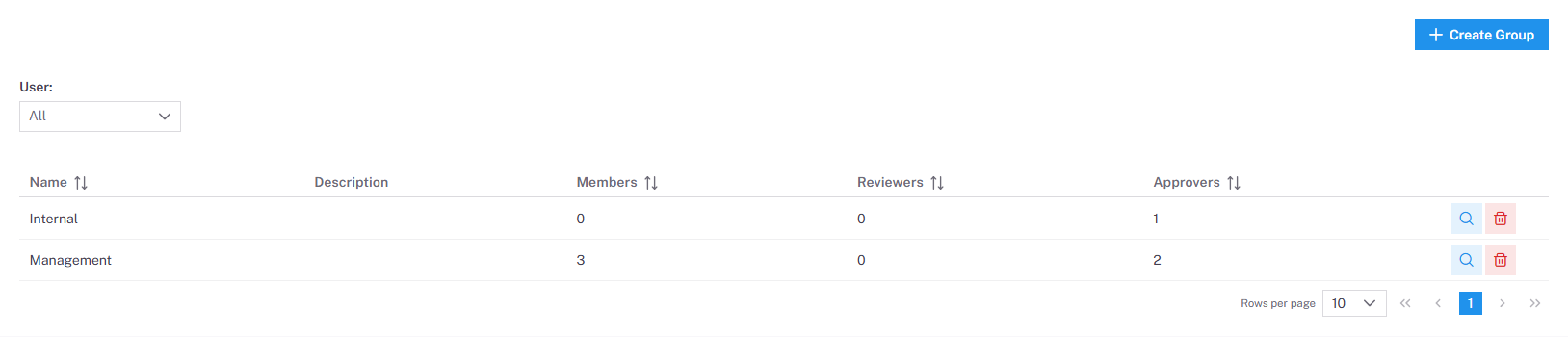
- Click the magnifier icon on a group's row to open it. There you can change its name, description, and members. Click the bin icon to delete the group.
The list shows counts of Members, Reviewers, and Approvers so you can see the shape of each group at a glance. You can also filter the list by User.
Being a Reviewer alone does not show Approvals. To approve, a person needs the group role Approver or the Timesheet Approve permission. See Who sees what.