Organization approval period
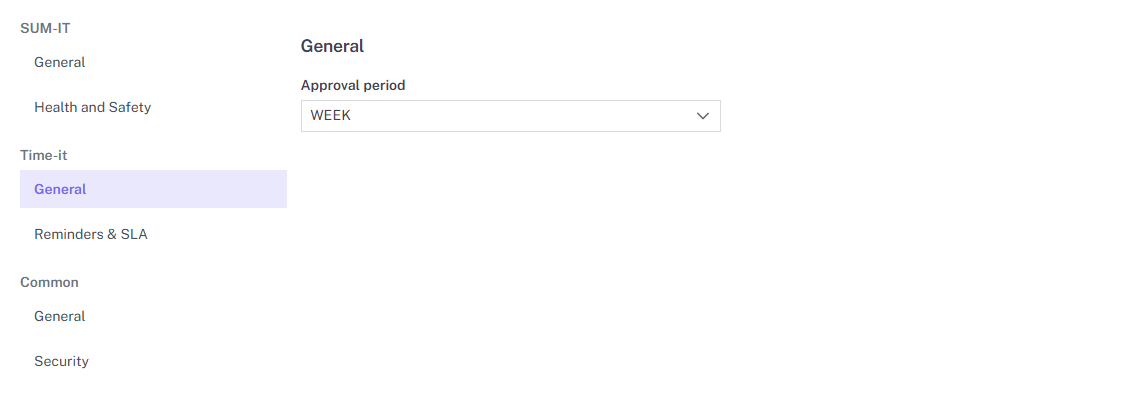
The organization Approval period decides whether people submit time by day, by week, or by month. Everyone in the organization shares the same choice. In Administration, open Settings → System in the left menu. Then, under Time-it, choose General.
What it changes
The dropdown shows DAY, WEEK, or MONTH.
- On List View, period sections and Submit / Unsubmit follow this period.
- On Approvals, each row is one person's day, week, or month.
- When a period is approved, all its days are locked together.
When you change it
Time-it asks you to confirm before it saves. The confirmation uses everyday words (Daily, Weekly, Monthly), even though the dropdown itself shows DAY, WEEK, or MONTH.
If you switch from Weekly or Monthly to Daily
- Periods that are still In progress, Pending, or Rejected are split into one daily period for each day that already has hours logged.
- Periods that are already Approved stay as they are. They keep their weekly or monthly shape as history.
- From then on, people log and submit time by day.
- This split cannot be undone automatically.
If you switch to Weekly or Monthly (from Daily, or between Weekly and Monthly)
- Future submissions and approvals use the new period size.
- Existing approvals are not merged, changed, or cancelled.
- People keep working with older approved rows as history. On Approvals you may see a mix of daily and weekly or monthly rows for a while.
It is best to choose the period once, before people start submitting. Change it with care.
Who can change it
You need Administration settings edit permission. With view-only access you can see the value but not change it. Personal display preferences do not override this setting.